
You recorded an hour of useful conversation. If that episode goes live, gets shared once, and then disappears, most of its value goes with it. To repurpose podcast content is to turn that one recording into clips, show notes, articles, and posts that keep your expertise in front of clients for weeks.
For most business owners, it is also the simplest form of podcast promotion: no ad budget and no extra filming days. This guide covers what one episode can become, how to plan for it, and a 4-week calendar you can copy.
What does it mean to repurpose podcast content?
Repurposing podcast content means reshaping one recorded episode into smaller pieces for each channel where your audience spends time. The full episode is the source material, not the only finished product.
A 60-minute conversation usually holds several strong answers, a story or two, and a handful of quotable lines. Each one can stand on its own as a clip, a post, or a section of an article. Recording day stops being about making one episode and becomes a way to capture a month of material for podcast promotion.
Why repurpose video content instead of creating new posts?
Repurposing video content makes sense because one recording already gives you video, audio, and text, and audiences now watch podcasts as much as they listen. “For the first time, video podcast consumption outpaced audio consumption in Edison Podcast Metrics,” Edison Research vice president Megan Lazovick told Inside Radio, adding that “video podcast consumption is the changing variable here.”
Much of that viewing happens on YouTube, which reported more than 1 billion monthly viewers of podcast content as of early 2025.
Repurposing also solves the consistency problem. Instead of filming new posts every week, you pull them from material you already have. And because it's video, each piece shows prospects how you speak and explain, something an audio file or text post can't do on its own. We cover that difference in more depth in video podcast vs. audio podcast.
What can you make from one podcast episode?
One well-planned episode can produce six types of content. Start with the video and work down to text.
The full episode on YouTube and podcast apps
The full episode is the anchor that every other piece links back to. Publish the video on YouTube and the audio on Apple Podcasts and Spotify. A clear title, a custom thumbnail, and a keyword-rich description help new viewers find it in search.
Short-form clips
Short clips are how most new viewers will discover your show. In Sounds Profitable's Podcast Atlas research, 89% of podcast listeners said they watch clips on social platforms at least sometimes, and 81% said clips at least sometimes lead them to watch a full episode.
Aim for 3 to 5 clips of 30 to 90 seconds each. Pick moments that make sense without context, such as a strong opinion, a short story, or a direct answer to a question clients often ask. Format them vertically with captions for Instagram Reels, TikTok, YouTube Shorts, and LinkedIn.
Podcast show notes
Podcast show notes are the written summary that sits with each episode on your website, YouTube, and podcast apps. They help people decide whether to watch, and they give search engines text to index. Good show notes include:
Summary: two or three sentences on what the episode covers and who it's for.
Key takeaways: three to five points a reader can scan.
Timestamps: the start time of each main topic.
Links: guest details, resources you mentioned, and how to contact you.
A blog post or LinkedIn article
An article turns the episode's main idea into something people can read, skim, and share. Use the transcript as source material rather than pasting it in. Tighten the structure, add headings, embed the video, and aim for 1,000 to 1,500 words. For professional services, a LinkedIn article reaches the referral partners and clients who already read there.
Quote graphics and text posts
Your sharpest lines can work as standalone posts. Pick two or three and share them as simple quote graphics or plain text. On LinkedIn, a short post with a clear opinion can start a conversation in the comments.
An email to your list
An email puts the episode in front of people who already know you. Keep it short: the episode's one big idea, why it matters to the reader, and a link to watch.
How do you plan an episode that's easy to repurpose?
Plan your clips before you record, not after. As Sounds Profitable partner Tom Webster wrote in The Podcast Atlas, "Clips don't recruit by accident." The moments that travel well on social are usually the ones you set up on purpose.
Pick one core question: an episode about one problem produces clearer clips than a wide-ranging chat.
Answer first, then explain: give the direct answer in a sentence or two, then the example. Each answer becomes a ready-made clip.
Include one story: a short client story, with details changed for privacy, is often the most shareable moment.
Close with a takeaway: it becomes your email subject line and your final quote graphic.
Flag strong moments on the day: jot down rough timestamps so editing goes faster.
If this is your first session, our guide on how to prepare for your first podcast recording covers the rest of the prep.
What does a 4-week podcast social media strategy look like?
A good podcast social media strategy gives each week of the month a different job: launch the episode, go deeper on the topic, reach new people, and start a conversation. Spreading one episode this way lets you post three times a week without running out of material or repeating yourself.
Here is a sample plan built from one 60-minute video episode with five clips.
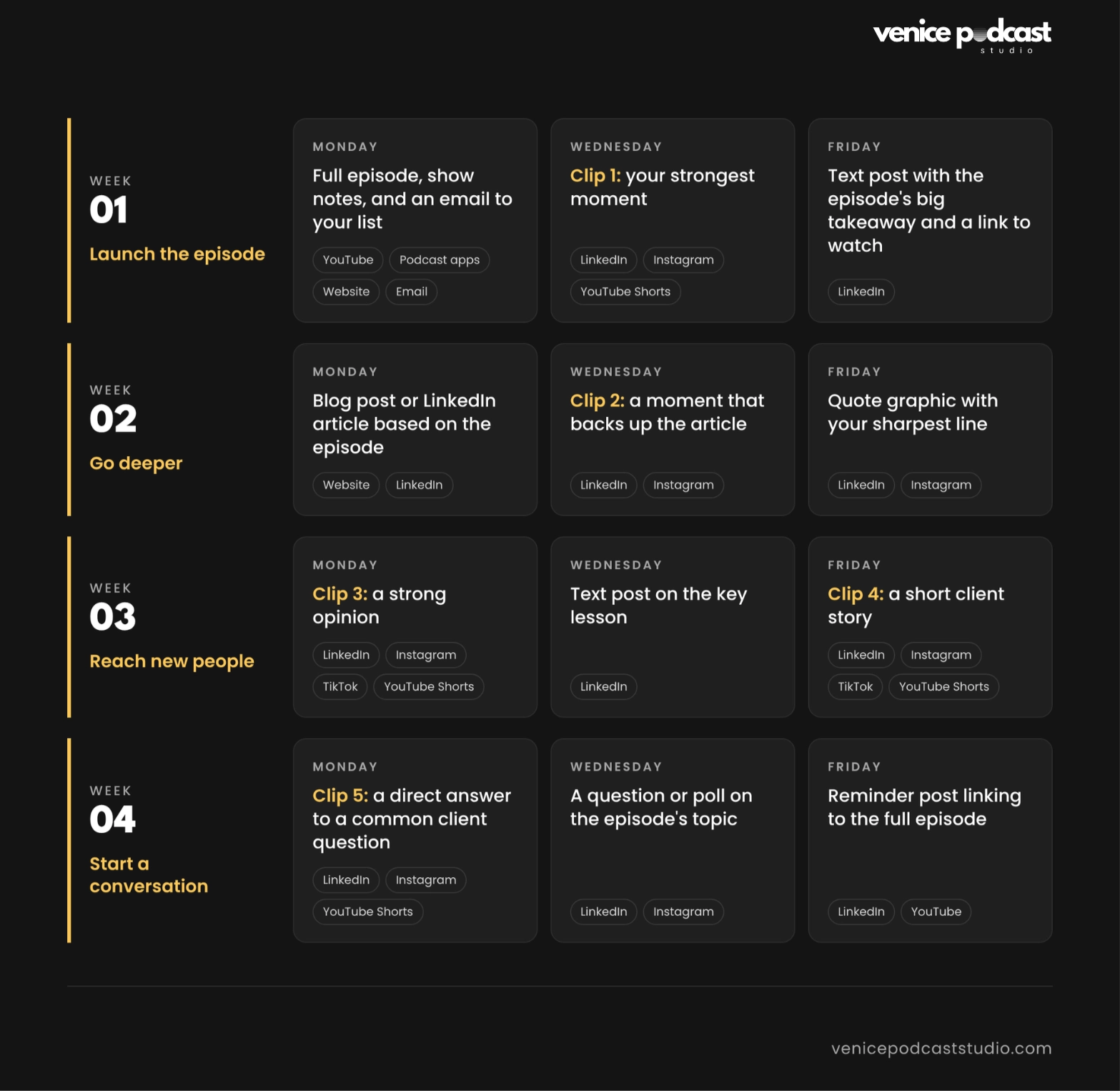
That's 14 pieces of content from one hour in the studio. This is a sample schedule, not a requirement to publish every asset across every platform. The platforms listed are options, not a checklist. Most business owners should focus on one primary platform and one secondary platform, choosing based on where their audience spends time. Adjust the publishing frequency based on your team's capacity and available resources.
The goal is to give each episode multiple opportunities to reach people without making your content repetitive.
How do you repurpose podcast content without a content team?
You can build a repeatable workflow yourself or work with a production partner that delivers the pieces with your episode. The right choice depends on how much time you can give it each week.
Doing it yourself
The DIY route works if you can set aside a few hours every week. You'll need editing software, a captioning tool, a transcript, and a way to schedule posts. The common risk is that editing slips behind client work and posting stops after a few weeks.
Working with a production team
At Venice Podcast Studio, repurposing is built into our produced bundles. You record in our private studio in the Del Rey neighborhood on Los Angeles' Westside, and the edited episode and its assets arrive within 5 business days.
Authority Session ($749): a one-hour session, a full-length episode edit, 3 social clips, and a LinkedIn article or blog post draft.
Authority Launch ($12,900 for 12 episodes): each episode includes a full edit with custom intro and outro, 5 social clips, an article draft, a custom YouTube thumbnail and SEO package, a transcript, and show notes.
Authority Engine (from $2,300 a month for 2 episodes): the same per-episode assets as the Authority Launch, on a steady monthly schedule.
On the two-episode Authority Engine plan, you get 10 clips, 2 article drafts, and 2 sets of show notes each month, enough to run the calendar above for both episodes. For a wider look at budgets, see our guide to what a video podcast costs.
Frequently asked questions
How to promote a podcast on social media?
Post short, captioned clips on the platforms your clients use, link each one to the full episode, and keep a steady weekly schedule. Organic posting carries real weight.
How many clips should you make from one episode?
Three to five clips is a good target for a 60-minute episode. That gives you one or two a week for a month without repeating yourself.
Which platforms should you repurpose podcast content for?
Choose one primary platform where your audience is most active and one secondary platform for repurposing. LinkedIn suits professional services and B2B, Instagram and TikTok suit consumer-facing businesses, and YouTube helps people find you through search. Focusing on two platforms can help you maintain consistency, and get more value without stretching your resources too thin.
Can you repurpose old podcast episodes?
Yes. Older episodes often answer questions your audience still searches for. Pull fresh clips, update the show notes, or turn a past episode into a new article that links to your latest work.
How do you get started?
You don’t need to record something new every day to stay visible. One well-planned episode can give you a month of material when you decide how you’ll repurpose it before you record.
Start with your next episode. Build it around one core question, flag your strongest moments on the day, and use the 4-week calendar above to spread it out. If you’d rather have the editing and repurposing done for you, schedule a call with our team. We’ll walk you through what a fully produced episode includes and help you plan a show that fits your business needs.