
It's Thursday afternoon. Your next podcast episode is due Monday, and you still haven't picked a topic, booked a recording time, or confirmed a guest. So you push it back a week. Then another. Somewhere around episode six, the show quietly stops.
That's how most business podcasts end. The host still has plenty to say. What runs out is the time to plan every single week.
A podcast planning template fixes that. You make every decision for the season in one afternoon, then record a month of episodes in a single day. After that, your Thursdays go back to running your business.
This guide shows you what to put in your template, how to plan a full season in five steps, and how to batch record video episodes without running out of energy on camera. You can download our free template below and fill it in as you read.
What is a podcast planning template?
A podcast planning template is a reusable document that holds every decision behind your show: who it's for, when episodes go live, what each one covers, and what happens on recording day. Instead of starting from scratch each week, you fill in the same fields for every episode.
For a business, the template has one more job. It ties every episode back to a business goal, so the show brings in clients instead of just filling a content calendar.
Free template
Plan your entire podcast season in one go
Map out your episodes, schedule batch-recording days, and organize your production workflow with this free, reusable podcast planning template.
Where should we send your template?
Enter your name and email, and we'll send the template straight to your inbox.
Why do business podcasts need a plan?
Because most podcasts stop before they have time to work. CastFox Research sampled 100,000 podcast feeds in 2026 and found that 22.8% ended after one episode and 52.8% never got past six.
That matters because a business podcast builds authority through repetition. One episode is a single impression. A year of episodes is a library prospects can watch before they ever call you. By CastFox's count, a show that publishes weekly for a year already has more episodes than about 88% of all podcasts ever started.
Staying consistent is mostly a planning problem. When your next four episodes are outlined, or already recorded, a busy week doesn't break your schedule.
What should a podcast planning template include?
A podcast planning template should include four parts: a show plan, a podcast schedule, an episode planner, and a batch session plan. You use each one on a different timeline.
Show plan: fill in once
The show plan sets your strategy. Complete it before you plan any episodes, and review it each quarter.
Goal: the one business result the show supports, such as booked calls, referrals, or speaking invitations.
Audience: who you want watching, in one sentence. Being specific works better than broad terms like "business owners."
Format: solo, interview, or co-host.
Episode length: a target range, such as 20 to 30 minutes, that you keep consistent.
Cadence and release day: how often episodes go live, and on which day.
Distribution: YouTube for the full video episode, podcast apps for audio, short clips for LinkedIn and Instagram, and your website.
Call to action: the one next step you'll mention in every episode.
Podcast schedule template: update weekly
Your podcast schedule is the season at a glance. One row per episode shows what's planned, what's recorded, and what goes live next.
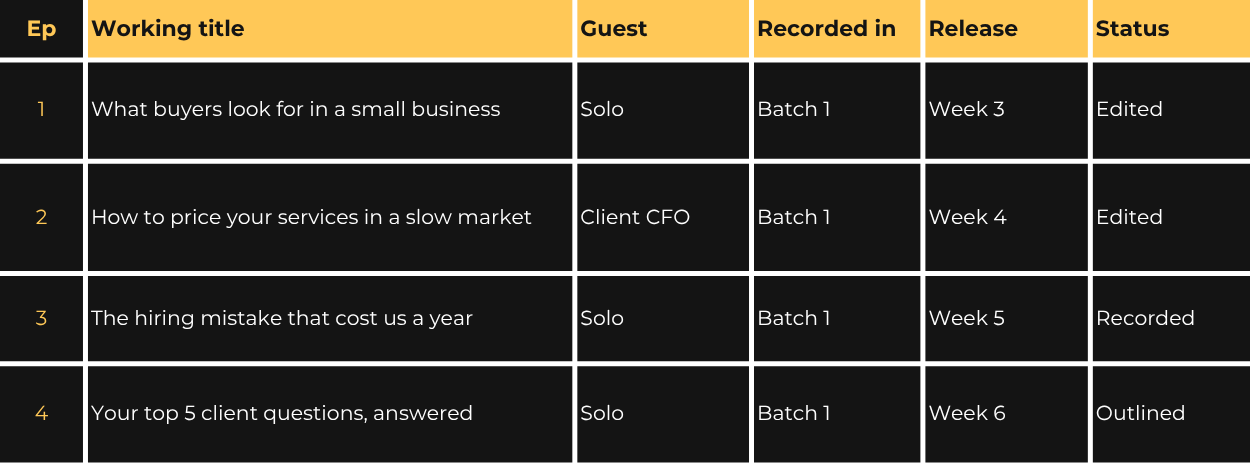
Keep the status labels short so anyone on your team can scan the sheet: idea, outlined, recorded, edited, scheduled, and published.
Episode planner: one per episode
The episode planner is the outline you bring into the studio. Keep it to one page so you can glance at it between takes.
Working title: phrase it the way a client would ask the question.
Core question: the one question the episode answers.
Three key points: stopping at three keeps the conversation focused.
Story or example: a client result, a mistake, or a number that makes the point stick.
Guest details: name, title, a short intro, and the questions you'll ask.
Clip moments: two or three lines you want short clips built around.
Notes for your editor: names to spell in on-screen titles, links for the show notes, and anything to cut.
Batch session plan: one per recording day
The batch session plan is your run sheet for recording day. It keeps the day moving and makes sure nothing gets left at the office.
Episode order: which episode you record first, second, and so on.
Guest arrival times: with enough buffer that no one waits.
Wardrobe: one outfit for a consistent look, or a change of top so episodes look like they were recorded on different days.
Materials: episode planners, product samples, or anything else you'll show on camera.
Breaks: 30 minutes between episodes, plus lunch.
Each of these four parts is a page in the free template linked above, so you can fill them in as you read.
How to plan a podcast season?
Start with your goal, turn it into a topic list, group the topics into recording batches, and set your dates backward from release. Most business owners can do this in 1-2 afternoons.
1. Set one goal for the show
Pick the single result you want the show to drive. A financial advisor might want more referrals. A consultant might want speaking invitations. That goal shapes your topics, your guests, and the call to action at the end of every episode.
2. Choose a cadence and release day you can keep
Weekly is the most common schedule: 41.5% of active podcasts publish about once a week, according to CastFox. Business shows run a little slower, with a median of 9.5 days between episodes. Choose the pace you can hold for a full year, not the most ambitious one.
Pick a fixed weekday, too. An Ausha analysis of Edison Research's Top 50 US podcasts found that most release on weekdays, especially Mondays and Thursdays. Gabriel Soto, Senior Director at Edison Research, explained why: "Podcast success favors consistency, which helps instill shows into consumers' routines."
3. List 12 episode topics
Write down the 20 questions clients ask you most, then keep the 12 strongest. Group them into three or four themes so the season builds on itself. If you need more ideas, our list of video podcast content ideas for business owners has more than 30 formats to choose from.
4. Group topics into recording batches
For a weekly show, three batches of four episodes cover a 12-episode season. Put related topics in the same batch so you stay in one frame of mind, and spread guest episodes across batches so no single day gets overloaded.
5. Set dates backward from release
Pick each episode's release date first, then work back. Leave time for editing, your review, and a round of revisions. Aim to record each batch four weeks before its first episode goes live. Two weeks is the minimum.
How do you batch record podcast episodes?
Batch recording means recording several episodes in one visit instead of one each week. For a weekly show, two-four episodes in a day covers a full month.
How many episodes should you record in one batch?
Your energy on camera sets the limit. Many hosts find three or four episodes is the most they can record before their delivery starts to slip, and fatigue is easier to see on video than to hear on audio. For your first batch, start with two or three and notice how you feel by the last one.
What does a batch recording day look like?
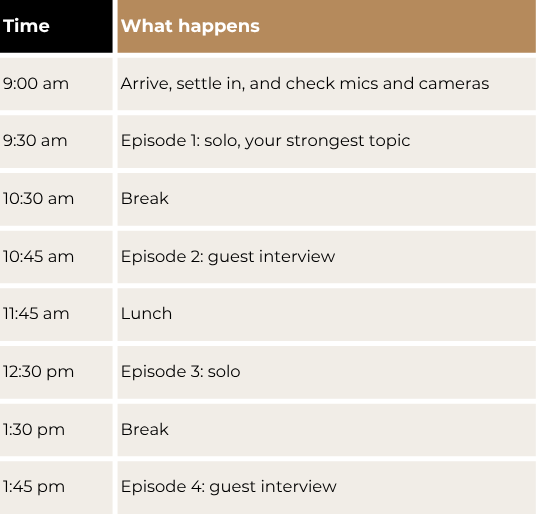
Here's a sample four-episode day. Arrive 5 to 10 minutes early to settle in. Adjust the times to fit your episode length and your guests' schedules, and treat it as a starting point: record as many episodes in one session as you're comfortable with.
How do you prepare for a batch day?
Review every planner the night before: one read-through per episode is enough to keep the day running smoothly. Our checklist for your first podcast recording covers what to bring and how to prepare.
Lead with your strongest topic: your energy is highest early, so record the episode that matters most first.
Rest your voice: drink water and talk as little as possible during breaks.
What does a 12-episode podcast schedule template look like?
For a weekly publishing cadence, a 12-episode season takes three-five batch days depending on the episodes you record per week. Each new batch is recorded before the previous one runs out, so you're never recording against a deadline.
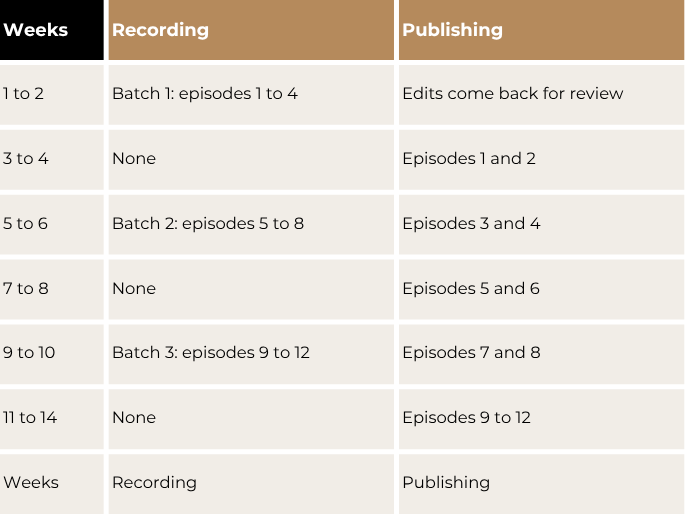
With this rhythm, you stay four episodes ahead at all times. A sick day or a busy month won't break your schedule.
It's also how the Authority Launch at Venice Podcast Studio works: 12 fully produced episodes designed for a 90-day launch, recorded weekly or in batches of up to four sessions per visit. Each episode comes back edited, with five social clips, show notes, a YouTube thumbnail, and a blog post or LinkedIn article draft, within five business days. An on-site engineer runs the multi-camera 4K video and audio in our studio in the Del Rey neighbourhood on the Westside of Los Angeles, so on batch day your only job is the conversation.
Frequently asked questions
Where should you keep your podcast planner template?
Keep it wherever your team already works. A spreadsheet or printed workbook is enough for a solo host. If you hand off work to an editor or assistant, a tool like Notion, Asana, or Trello lets each episode hold its outline, files, and status in one place.
Should you script your podcast episodes?
Usually not. A word-for-word script tends to sound stiff on camera, while an outline with three key points keeps you natural and on track. If you want help with your opening or closing, a teleprompter can hold those lines for you.
Can you batch record episodes with guests?
Yes. Give each guest their own time slot with a buffer between them, and send your questions a few days ahead. If a guest can't come in person, you can record them remotely with our remote guest add-on, though the quality depends on their camera, microphone, and internet connection.
Does batch recording make episodes sound dated?
Only if you mention dates, holidays, or current events. Keep batch topics evergreen, and record time-sensitive episodes on their own, closer to release.
How much does it cost to batch record a video podcast?
At Venice Podcast Studio, the Authority Launch costs $12,900 for 12 fully produced episodes, about $1,075 per episode, and you can record weekly or batch up to four sessions per visit. A single produced episode, the Authority Session, costs $749. For a full breakdown, see our guide to how much a video podcast costs.
How should you start planning your podcast?
Block one afternoon this week. Fill in your show plan, list the 12 questions your clients ask most, and group them into three to five batches. By the end, you'll know exactly what you're recording first.
If you're ready to record your first month of episodes, schedule a call with Venice Podcast Studio. We'll help you map your first season and plan a recording day that fits your schedule.