
Remote podcast recording lets you interview anyone, anywhere, without leaving your desk. A studio gives you professional cameras, lighting, and sound, with an engineer to run them. So which is better?
Remote recording is better when reaching the right guest matters most. A studio is better when your video represents your business. And if you need both, you can record in a studio while your guest joins remotely.
Below, we compare the two side by side, walk through how to record a podcast remotely with guests, and explain when a hybrid setup makes sense.
What is remote podcast recording?
Remote podcast recording is when a host and guests record one conversation from different places, connected over the internet. How the conversation is recorded makes a big difference to the final quality.
The simplest way is to record a video call on Zoom or Google Meet. That recording captures whatever made it across the internet, so if someone's connection dips, the video freezes or blurs in the final file.
Podcast platforms such as Riverside and Descript Rooms use local recording instead. Each person's device records their own camera and microphone, then uploads the files during and after the session. Because the files don't depend on the live connection, you get clean, separate tracks for every speaker, up to 4K video.
Is remote podcast recording as good as a studio?
For audio, remote recording can come close. For video, it usually can't. Even with local recording, quality depends on each person's camera, microphone, lighting, and room, and most guests aren't set up for broadcast.
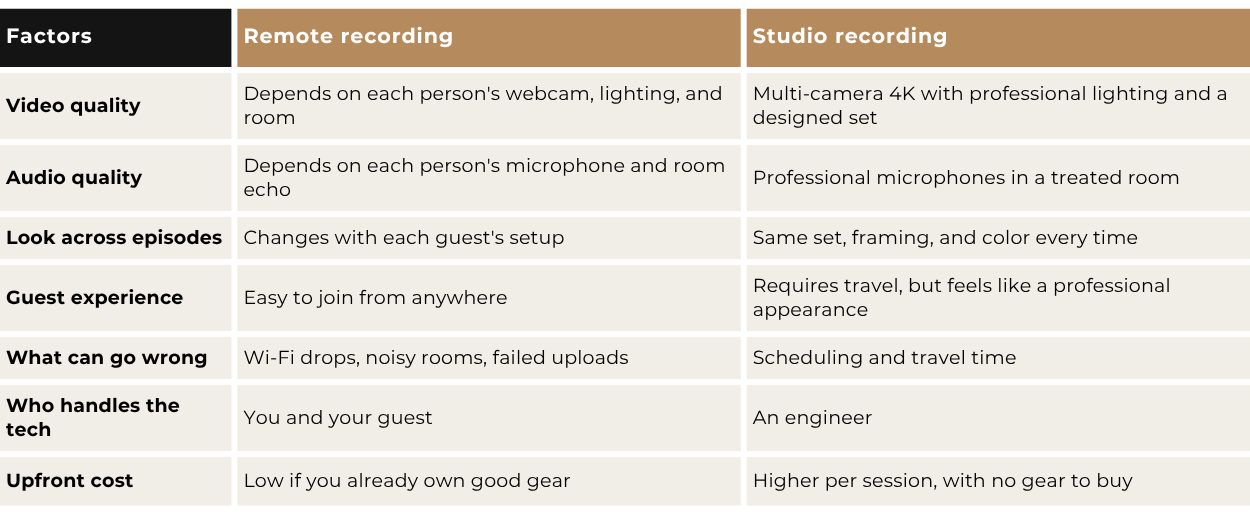
The last row deserves a closer look. Remote recording is only cheap if you and your guests already own a good camera, microphone, and lights. Our breakdown of home studio vs. professional studio costs shows what that gear really adds up to.
When should you record a podcast remotely?
Record remotely when getting the conversation matters more than how it looks on camera. That's usually true in three situations.
Your guest can't travel: The best guest for your audience might be a client in another city or an executive with 30 minutes between meetings. Remote recording means you never turn down a great guest because of distance.
You're testing the format: If you're not sure a podcast is right for your business, a few remote episodes are a low-cost way to practice interviewing and find out if you enjoy it.
Your show runs on frequent interviews: Some shows book guests at short notice or record several interviews a week. Remote recording keeps that pace manageable, especially for audio-first shows.
When is a studio worth it?
A studio is worth it when your podcast represents your business and you want every episode to look and sound profeesional. These matter most when your guests are clients or referral partners.
When people will watch, not just listen
Most podcast audiences now watch. In Q3 2025, 82% of weekly U.S. podcast consumers actively watched video podcasts, compared with 78% who listened to audio only, according to Edison Research. YouTube is now the service they use most for podcasts, at 37%.
Screens are getting bigger too: 13% of weekly podcast consumers now name a TV as their main podcast device, up from 1% in 2021, according to SSRS. On a TV, a grainy webcam and a dim room are hard to miss. If video is part of your plan, see why video podcasts reach more people than audio alone.
When the conversation needs chemistry
Sitting in the same room changes how people talk. There's no audio lag, so you don't talk over each other, and you can read your guest's reactions to know when to follow up and when to let them keep going.
Nathan Barry, founder of Kit (formerly ConvertKit), puts it plainly: "Podcasts recorded in person perform so much better than podcasts recorded virtually." He still records most of his own episodes remotely, though, and says recording virtually is better than not recording at all.
When you want a consistent look
In a remote recording, each person brings their own camera, microphone, lighting, and room. The edit cuts between a well-lit host and a guest who looks dim, sounds echoey, or sits too close to the camera, and viewers notice. In a studio, you and your guest share the same set, cameras, lights, and microphones, so the conversation looks and sounds like one piece.
That consistency carries from one episode to the next. The same framing and color every time makes your show look established and your clips easier to brand.
When you're new on camera
An engineer handles the cameras, sound, and lighting, so your only job is talking with your guest. That helps if you're new on camera, and a teleprompter can help you deliver your opening and closing with confidence. You can also record several episodes in one visit, with no setup between them. If it's your first session, our podcast recording checklist covers what to plan and bring.
How to record a podcast remotely with guests?
To record a podcast remotely with guests, use a platform that records locally, prepare your guest's setup in advance, test before you start, and record separate tracks with a backup. Here's how to do each step.
1. Choose a platform that records locally
Riverside, Descript Rooms, and SquadCast all record each person on their own device. Riverside's Pro plan costs $24 a month billed annually and includes 15 hours of separate-track recording a month. Descript Rooms comes with Descript's paid plans, so you can record and edit in one app.
2. Send your guest a setup checklist
Your guest's setup decides half of your episode's quality. Send this a few days before:
Connection: use a wired connection, or sit close to the router.
Device: join from a laptop or desktop, not a phone, and close other apps.
Microphone: a USB microphone or wired earbuds with a mic beats a built-in laptop mic.
Light: face a window or lamp, and don't sit with a bright window behind you.
Room: pick a quiet room with soft surfaces, such as curtains, a rug, or a bookshelf, to cut echo.
Headphones: wear them so your audio doesn't echo into their microphone.
3. Test 10 to 15 minutes before you record
Check each person's framing, microphone level, and background, then record a 30-second test clip to make sure it uploads.
4. Record separate tracks and a backup
Separate tracks let your editor fix one person's volume, cut crosstalk, and switch between speakers. Ask guests to keep the browser tab open until their upload finishes, and record a backup audio file on your own computer in case one fails.
5. Plan for extra editing
Remote footage usually needs more work than studio footage. Your editor will need to match color and audio between speakers, trim delays, and cover any frozen frames.
How to record a podcast with remote guests on Zoom
You can record a podcast on Zoom, but it isn't built for it. Use local recording rather than cloud recording, and turn on "Record a separate audio file for each participant" in the desktop app's Recording settings. Turn on HD video as well. Zoom's 720p requires a paid account, and 1080p requires a Business, Education, or Enterprise account with the setting enabled by Zoom Support. Even then, the video reflects what came across the connection, so expect lower quality than a local-recording platform.
Can you record in a studio with remote guests?
Yes. In a hybrid setup, you record on a professional set while your guest joins over Zoom or Riverside. It's the simplest way to record a podcast with remote guests without giving up the look of your show.
Your side of the conversation, usually the side viewers see most, gets studio cameras, sound, and lighting. Your guest still depends on their own setup, so the checklist above still applies. The difference is that an engineer sets up the connection, monitors both sides, and catches problems during the session instead of after it.
At Venice Podcast Studio, remote guests can join any session by Zoom or Riverside for a $75 per-session add-on. You send the meeting link, and the engineer handles setup and monitoring from our Del Rey studio while you're recorded in multi-camera 4K. What you get afterward depends on whether you need editing:
Edited episode: book an Authority Session ($749) and add a remote guest. You'll get a full multi-camera edit, three social clips, and a LinkedIn article or blog post draft within five business days.
Raw files only: if you already have an editor, you can also book a recording only session ($250 an hour) and add a remote guest. Your raw files arrive the same day.
Studio or remote: which should you choose?
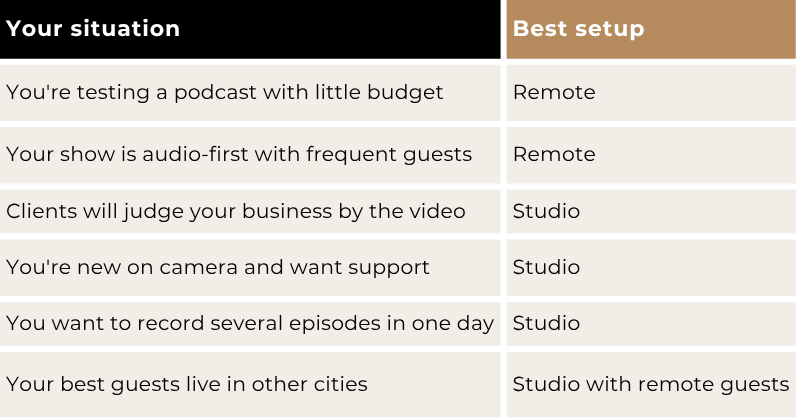
Choose remote recording for reach and flexibility, a studio for video quality and control, and a hybrid setup when you need both.
Frequently asked questions
What is the best platform to record a podcast remotely?
Riverside is the most common choice for video podcasts because it records up to 4K locally on each person's device. Descript Rooms and SquadCast work the same way. Pick the one that fits how you edit.
Can you record a podcast remotely for free?
Yes, with limits. Zoom's free plan includes local recording with separate audio files. Riverside's free plan gives you two hours of separate-track recording at up to 720p with a watermark, which is enough to test, but not to publish.
What internet speed do you need to record a podcast remotely?
Aim for a wired connection with steady upload speed. Zoom says sending 1080p video in a one-on-one call needs at least 3.8 Mbps upload. With local recording, a weak connection affects the live call but not the final files.
Do remote recordings take longer to edit?
Usually, yes. Your editor has to sync separate tracks, match color and sound between rooms, and fix any glitches. A studio recording with matched cameras and audio is faster to edit.
Get the reach of remote with the quality of a studio
You don't have to pick one setup forever. Many hosts record solo episodes in a studio and bring in remote guests when the right person lives in another city. The best setup is the one that gets the right conversation recorded in a way that represents your business.
If you're planning to record your business podcast in the Los Angeles area, schedule a call with Venice Podcast Studio. We'll help you choose the right setup for your show and plan your first session.